
How we use BCQuality for better Agentic Coding in AL
Every BC Partner has their own coding conventions. Microsoft and Community has certain coding conventions as well. Up until now it was really difficult to point your LLMs and humans to these conventions.
BUSINESS CENTRALAI
Mkublbock
7/10/20263 min read
BCQuality is a open source GitHub Repository from Microsoft that consists of best practices for AL Coding. The intention is to point all agents and LLMs to this repository for coding so that the generated code follows best practices everytime.
BCQuality only contains knowledge files that otherwise an LLM would get wrong. Just because a knowledge file is in there doesn't mean the rule is more important than others. It just means that LLMs would typically get this wrong. As an example Microsoft has added the following rule:
BCQuality/microsoft/knowledge/events/avoid-raising-events-inside-try-functions.md at main · microsoft/BCQuality · GitHub
BCQuality has three layers:
Microsoft - these are rules added directly from Microsoft that they think would benefit everyone
Community - these are rules added from the community. If you have a rule that you think could benefit others as well open a Pull Request and get it in there!
Custom - these are rules specific to your company/team
Most Business Central Partners have their own coding guidelines. These guidelines are hard to enforce in practice. Most of us create their own Analyzer for static code analysis during coding. Forcing everyone to use an Analyzer is also hard in practice. If someone doesn't use the Analyzer, the build pipeline will then analyze the code when a PR is opened. But, the build would still continue as most of the rules we add are Warnings and not Errors. In Practice almost no one inspects the build for the warnings. If the build succeeds that's good enough for most of us to merge the Pull Request.
This is where BCQuality into play. Microsoft said that tools like AL-Go will be integrating BCQuality on every Pull Request. As of right now you still have to manually point to it. This is how we do it:
Create a Fork of the BCQuality Repository - this fork will be used to populate the custom layer
Create custom knowledge files for your coding conventions using your favorite LLM
Most likely your coding conventions live somewhere in a knowledge database already. For us, our coding conventions were simple text files with a Title, Description, Good Code and Bad Code examples. Using your favorite LLM you can simply point to the BCQuality Repository and let it create new knowledge files for your coding conventions in the custom layer. Personally, I have used the GitHub Copilot Desktop App. The prompt I used to start off the conversation
"This repository is a fork from microsoft's bcquality repo that has three layers for al best practices
microsoft, custom and community
we want to populate the custom folder with our own coding conventions, can you please read through the repository and then let me know what's the best approach to get our coding conventions in the repository"
After this prompt the Agent and I came up with a plan of creating a knowledge file for each of our coding conventions. I simply copy-pasted all the coding conventions one-by-one, verified them and pushed them into the repository. Funny thing is, there were two or three rules that Microsoft had already included in BCQuality Repository.
Use copilot-instructions.md to let your Agent know about BCQuality
Everyone of your Repositories should have a copilot-instructions file. If not, you should definitely read about it and use it. It will improve the output of your LLMs as well as reduce cost. Your copilot-instructions file should now also include a section that will let your LLM know about BCQuality. This way whenever a Pull Request is reviewed by Copilot or you ask Copilot to do something for you it will know to look at the rules in the BCQuality Repository. Here's the part from our copilot-instructions:
## AI Quality Guidelines
Whenever working in this repository, apply the quality skills and knowledge defined in the BCQuality framework:
- Entry skill (routing): [`@COUNT-IT-GmbH-Business-Solutions-ERP/BCQuality` — `skills/entry.md`](https://github.com/COUNT-IT-GmbH-Business-Solutions-ERP/BCQuality/blob/main/skills/entry.md)
Use the entry skill to determine which action skills apply to the current task (code review, performance review, security review, etc.) and execute them accordingly.
Now, whenver we work together with Copilot it will know to use BCQuality best practices.
If for some reason you do not want to add this to the copilot-instructions file but call it manually instead, we simply use this prompt:
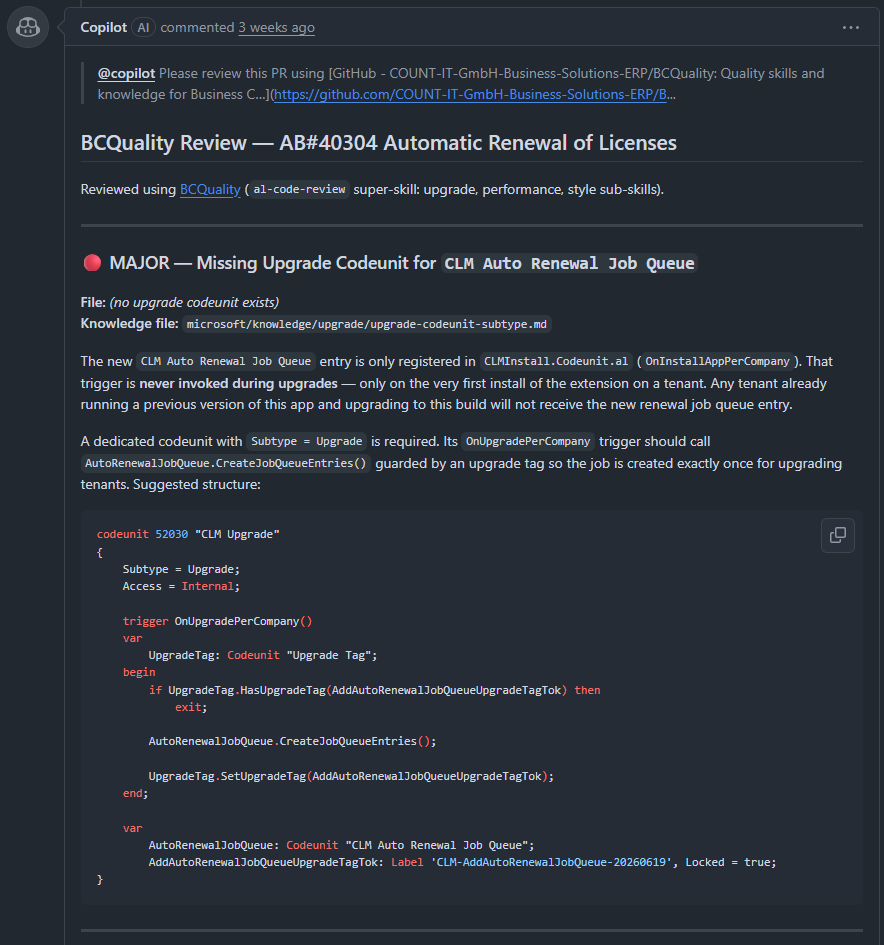
@copilot Please review this PR using https://github.com/COUNT-IT-GmbH-Business-Solutions-ERP/BCQuality Do not commit any changes! Any changes you deem necessary please write in a comment. Do NOT Commit anything!
And so far this has worked like a charm:
Summary:
BCQuality is a knowledge base for AL Coding best practices for humans and LLMs alike. You can fork BCQuality to populate the custom layer with your own coding conventions and point your LLMs to it using copilot-instructions.md or by manually referencing it in your prompts.
Matthias Küblböck
Microsoft Business Central Developer
©Mkublbock 2026. All rights reserved.